Product previewIn development · 4 October 2026
Dynamic Dash

Specifications and features

Your day. Your drive.
Your way.

Find your everyday favourites at a glance, then explore the full feature list or switch to the developer platform.

Made for your drive.

Music, maps, vehicle data and personal style. Keep the everyday interface as simple as you like.

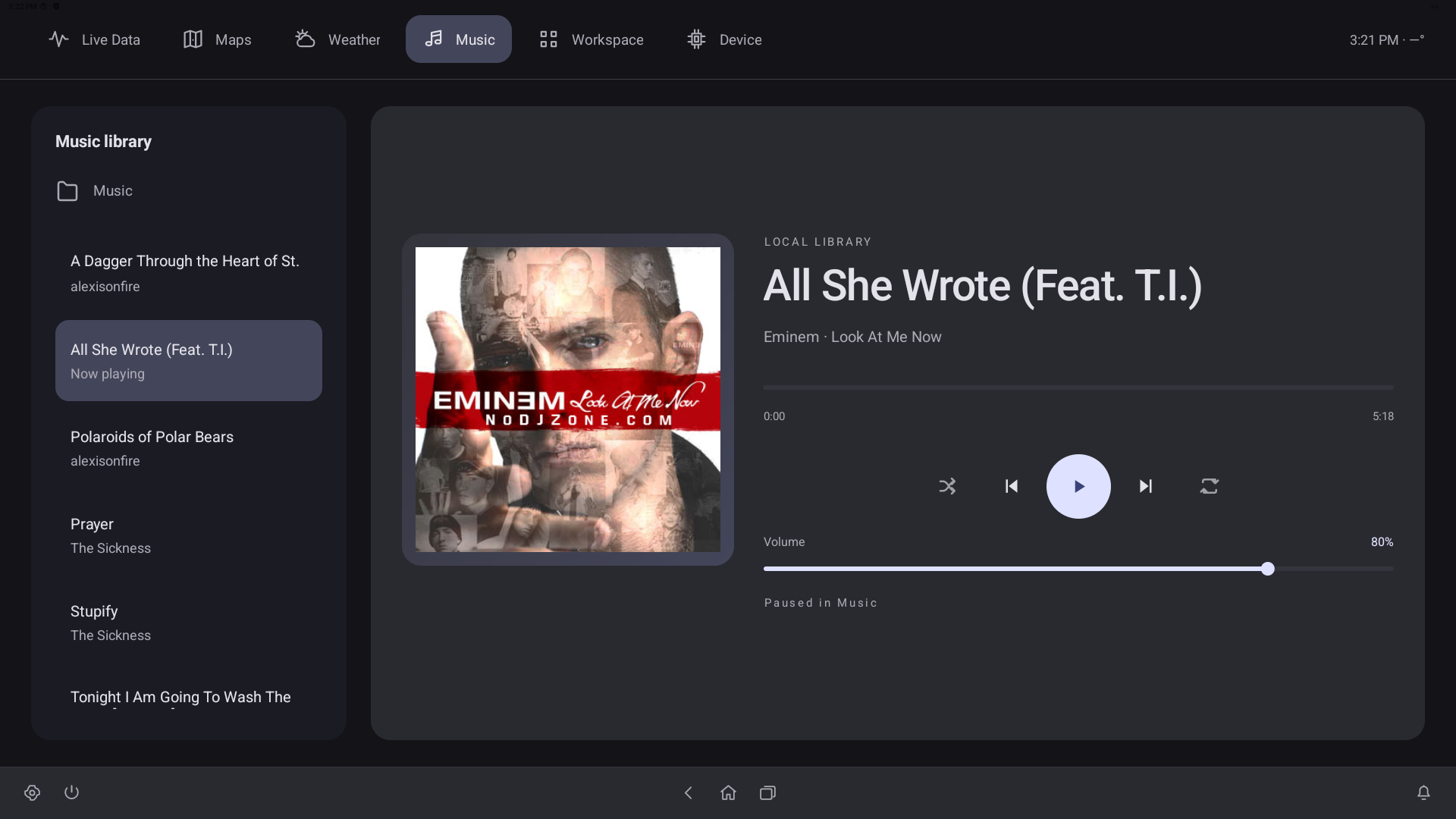
Your music

Local playback, ID3 album artwork and Bluetooth audio.

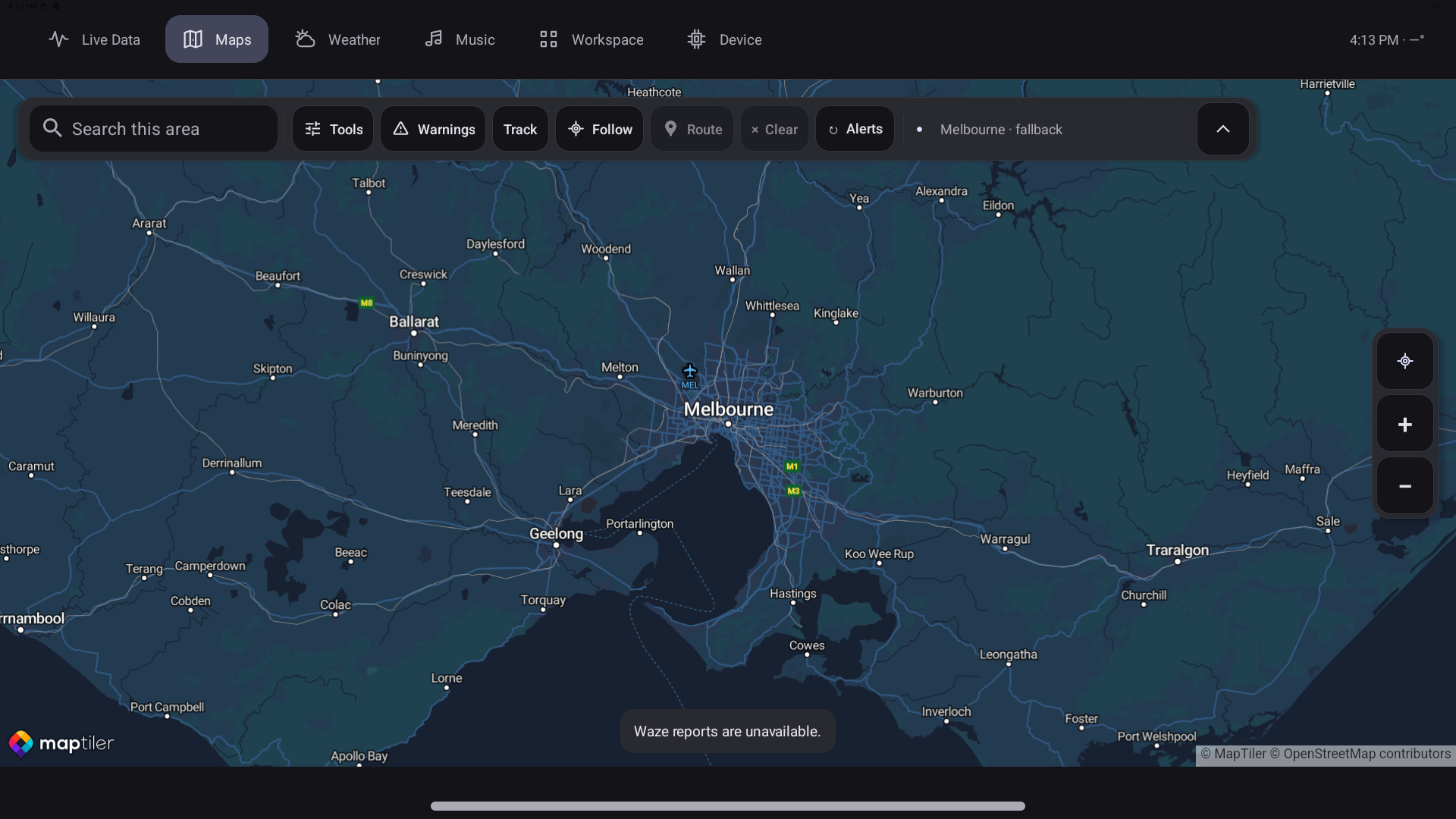
Maps and driving records

Record routes, replay a drive and explore its data.

Live vehicle information

Keep the readings that matter in your line of sight.

42 cluster designs

Choose a clear daily layout or something more expressive.

Favourite-cluster swipes

Swipe up or down through your favourites, with wraparound.

Your top bar

Show Maps and Music, focus on Live Data, or choose your own mix.

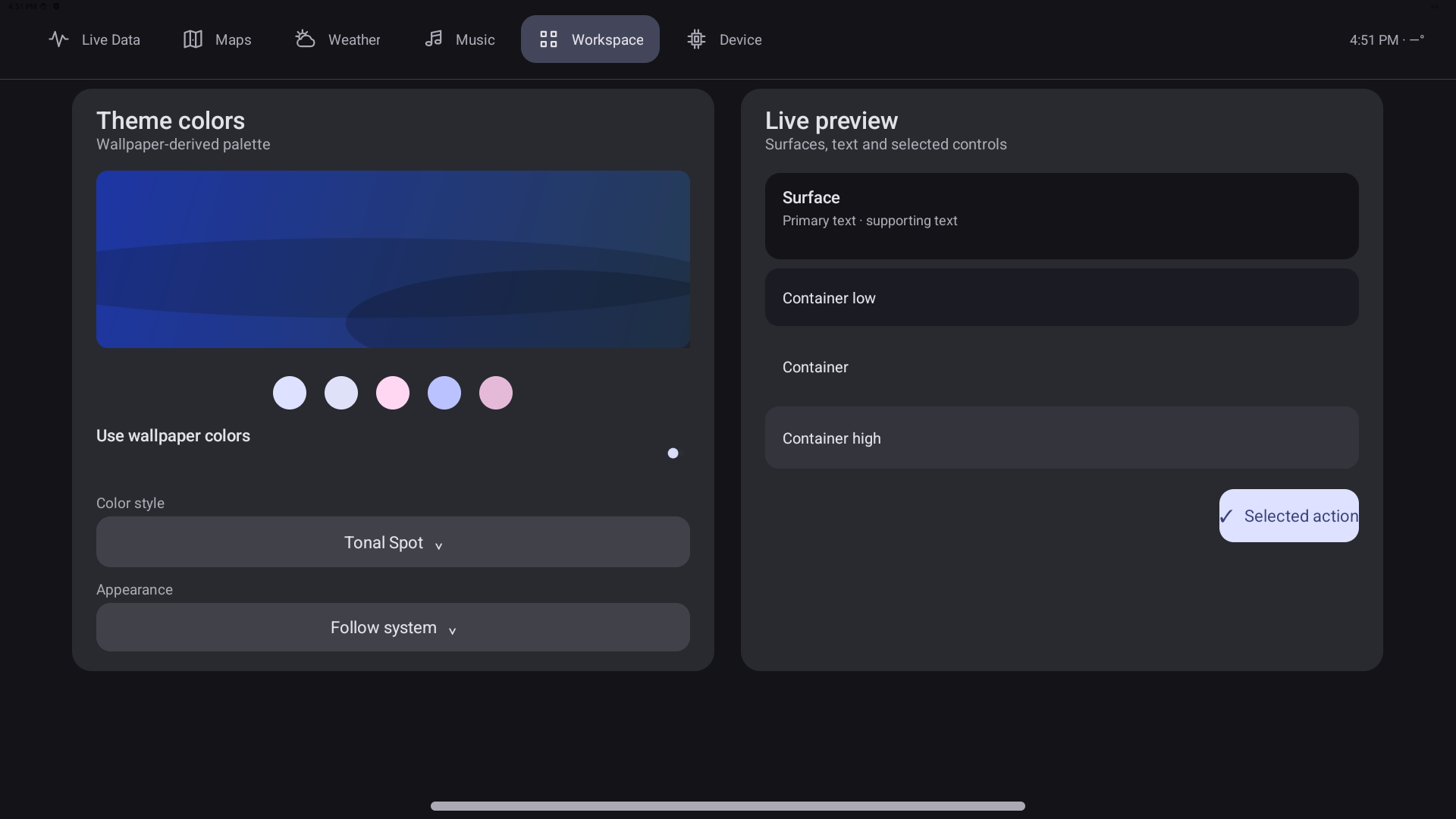
Your colours and style

Themes, Monet colours, wallpapers and Iconify customization.

Your Android workspace

Apps, widgets, weather and familiar everyday tools.

See it in the cockpit.

Music, maps and personal style share the same familiar interface.

Hardware specifications.

The current product platform. Configuration options are shown on the Hardware page.

Compute board
Khadas Edge2 Pro · bare board, no case
Processor
Rockchip RK3588S2 · 8-core 64-bit
CPU cores
4× Cortex-A76 2.25GHz + 4× Cortex-A55 1.8GHz
Memory
16GB LPDDR4X · 64-bit · 2112MHz
Storage
64GB eMMC 5.1
Graphics
ARM Mali-G610 MC4 · up to 700MHz
NPU
6 TOPS hardware capability
Wireless
Wi-Fi 6 · Bluetooth 5.0
Display connectivity
HDMI 2.1 · USB-C DisplayPort 1.4 · MIPI-DSI
USB ports
USB 3.1 · USB 2.0 · USB-C data/display + power
Board dimensions
82 × 57.5 × 5.7mm
Touch display
MageDock 13.6-inch 4K touchscreen
CAN interface
White Panda with custom firmware
System
Custom Android 14 / AOSP
Launcher
Custom launcher based on Lawnchair
Auxiliary display
Separate 5-inch ESP32 gauge

Built across vehicle platforms.

A flexible platform with vehicle-specific integration.

Dynamic Dash is developed across a 2016 HSV GTS and a 2017 Audi B9 S5, bringing the platform beyond a single vehicle brand.

Vehicle signals and integration remain specific to the vehicle and configuration. The optional 54-pin-to-54-pin Audi B9 harness is a B9-specific accessory and is included with the full system.

Features at a glance.

Explore the platform by how you use it. Pick a view without changing what the platform can do.

Music and weather
  • Local music playback. Play your own music collection from the dedicated Music destination.
  • ID3 metadata and album art. See track information and cover artwork from your library.
  • Bluetooth audio. Built-in Bluetooth audio support alongside the local music player.
  • Weather destination. Check weather information without leaving the familiar dashboard navigation.
  • Spotify integration. In development.
  • Android Auto support. In development.
  • Library and transport controls. Browse tracks, play or pause, seek through a track and control playback volume.
Maps, routes and driving records
  • Dedicated map workspace. View your position and mapped information within the dashboard.
  • Route recording. Record drives and retain their associated vehicle data.
  • Saved routes, courses and areas. Create, save, load and organize local map items.
  • Recorded-drive replay. Replay a saved drive and inspect what was happening along the route.
  • Timeline seeking. Scrub through the recording to examine a particular moment.
  • Configurable recorded signals. Choose the CAN data and sampling intervals to retain with a route.
  • Courses and time trials. Use recorded courses and timing tools for closed-course sessions.
  • Ghost comparisons. Compare a closed-course run with a recorded reference.
  • Map search and controls. Search, zoom, recenter and collapse controls to suit the task.
  • Course drawing and naming. Draw a route or area on the map, give it a name and keep it in your library.
  • Telemetry presets and events. Configure normal or complex event capture, signal presets and raw-frame recording options.
  • Mapped warnings and data feeds. Bring supported warning and GeoData information into the map workspace.
Clusters and live vehicle information
  • 42 selectable instrument clusters. Choose a design from the complete collection, including 12 additional OpenGL-rendered designs.
  • Cluster preview and selection. See a cluster before applying it to your dashboard.
  • Favourite clusters. Swipe up or down on the main cluster screen to cycle through favourites, with wraparound.
  • Personalized cluster appearance. Adjust needle colours and supported design options to suit your cockpit.
  • Driving-dynamics visuals. Advanced OpenGL clusters respond to vehicle signals and driving dynamics.
  • Vehicle-connected readings. Real CAN signals feed the dashboard, with timestamps and stale-data handling.
  • Live gauges and graphs. Choose signal targets and view incoming readings and history in configurable layouts with up to six graphs.
  • Shift-light controls. Configure the shift-light presentation alongside the cluster preview.
  • Road, Engine and Trip pages. The 12 Inspired designs include dedicated pages for different views of your driving information.
  • A broad vehicle-data surface. Present engine speed, road speed, fuel, gear, temperatures, intake, throttle, pressure, clutch, wheel/suspension and available GPS information.
Make it yours
  • Full Iconify integration. Customize the system appearance, with saved settings and defaults.
  • Custom themes. Carry a coordinated visual style across the interface.
  • Custom Monet integration. Choose a tonal colour source independently of the wallpaper.
  • Wallpaper selectors. Choose the wallpaper that makes the cockpit yours.
  • Home screen and app drawer. Configure layouts, icons and widgets through launcher settings.
  • Gestures and appearance settings. Tune the Android workspace to the way you use it.
  • Saved preferences. Keep your selected layouts and appearance choices between sessions.
  • Launcher settings and backup. Access dedicated launcher preference and backup controls.
  • Icons and Quick Settings. Choose icon styles, tile presentation and supported icon/label options through Iconify.
  • System appearance controls. Customize status/navigation bars, notification presentation, brightness, progress, switches and volume-panel appearance.
  • Shape and density. Adjust supported UI roundness, tile size, rows and columns.
  • Dock, folders and search. Tune the dock, folders, app-drawer search, At a Glance and Recents settings.
  • Live wallpaper surface. Choose the supported wallpaper and live-wallpaper services for your setup.
  • Clock and screensaver. Use the clock and screensaver presentation when you want a quieter display.
Apps, controls and everyday use
  • Customizable top bar. Show only the destinations you use: Live Data, Maps, Weather, Music, Workspace or Device.
  • Quick Access and taskbar. Use the compact pill or expanded taskbar for settings, power, notifications, back, home and recent apps.
  • Native Android workspace. Use apps, widgets and the app drawer inside the Lawnchair-based Workspace.
  • Android app and file access. Use installed Android apps and the integrated Material Files browser.
  • Window and system-bar controls. Use native panels and blur, and configure Android status and navigation bars.
  • Notifications and recent apps. Open notifications and switch between apps with the integrated Android surfaces.
  • Voice interaction. In development: speak requests to the connected assistant and hear its replies, using Whisper speech-to-text and Google’s text-to-speech.
Files and storage
  • Integrated Material Files. Browse storage and folders without losing the surrounding cockpit navigation.
  • Bookmarks and standard folders. Keep frequently used locations close and configure the folders you use.
  • Sorting and file options. Sort files and access the file browser’s common actions and settings.
  • Network storage setup. Add supported FTP, SMB, SFTP or WebDAV locations through Material Files.
  • Package and archive options. Use the integrated file browser’s Android-package and archive settings.

Build in Visual Studio.
Run on the dashboard.

First-class .NET plugins connect a familiar development environment with your own vehicle applications.

  1. Create.

    Start with a UI-panel or background-plugin template and develop against the supplied SDK.

  2. Build and package.

    Choose the project and configuration in the Visual Studio extension, then build a deployable plugin package.

  3. Select and deploy.

    Select the target device and deploy from the tool window.

  4. Make it part of the system.

    Pin a UI plugin in the top bar or run background logic. Manage a screen-free installation through the web interface.

The Android platform hosts CoreCLR with Roslyn and a substantial implemented .NET SDK. The supported WPF-shaped XAML surface maps to native Android controls. FastBinder provides a separate native/shared-memory transport between Java and .NET; Java reaches that layer through JNI.

Proposed configurations

Three ways to supply the same Dynamic Dash software platform. These are proposed configurations, with availability still to be determined.

The custom software, Android ROM and vehicle integration are the core of every configuration. Supplying your own hardware keeps that same substantial software foundation.

YOUR HARDWARE · DYNAMIC DASH PLATFORM

Bring your own hardware

Use customer-supplied compatible Khadas and Panda hardware with the Dynamic Dash software, custom ROM and integration. A screen is optional: manage plugins and inspect device health from a phone or PC in headless mode.

Hardware
Customer supplies Khadas and Panda
Software
Dynamic Dash software and custom ROM
Integration
Included in the proposed offering
Fit
Hardware compatibility confirmed for the intended setup
Audi B9 harness
Optional accessory

COMPUTE + CAN · PREINSTALLED

Bare bones

A supplied Khadas and Panda platform with Dynamic Dash software and its custom ROM preinstalled.

Hardware
Khadas + Panda supplied
Software
Dynamic Dash software and ROM preinstalled
Screen
No screen included
Format
Core head-unit hardware and software
Audi B9 harness
Optional accessory

ONE INTEGRATED UNIT

Full system

A screen, Khadas and Panda brought together in one integrated unit with Dynamic Dash software and its custom ROM.

Hardware
Screen + Khadas + Panda supplied
Software
Dynamic Dash software and ROM included
Screen
Included in the integrated unit
Format
Complete integrated head unit
Audi B9 harness
Included

Vehicle-specific accessory

Audi B9 integration harness

A proposed Audi B9-specific harness with a 54-pin-to-54-pin gateway connector and aviation-style breakouts for the CAN buses connecting to Panda.

Optional with Bring your own hardware and Bare bones. Included with the Full system.

Updates across all three

All three configurations support software updates for as long as updates are released and available. No fixed support duration or lifetime term is promised.

Future delivery options

Over-the-air updates are a possible future consideration, with no current OTA functionality or delivery commitment.

Pricing and availability are to be determined. Shipping details are coming soon. Expressions of interest are open; orders and payments are not.